Architecture
Architecture
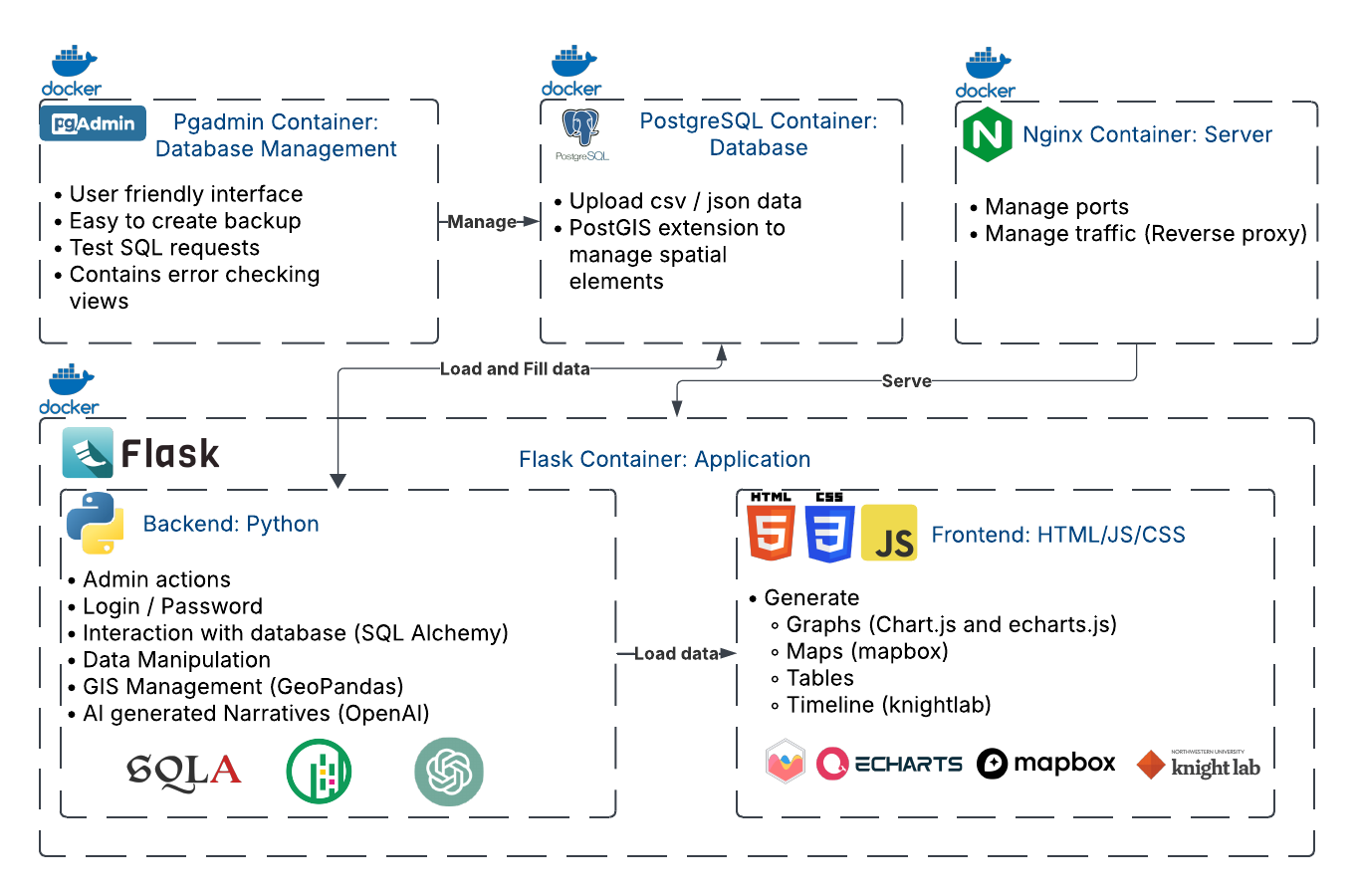
The application has been developed using Docker. Docker is helpful for creating different containers that interact with each other. These four containers are independent and are created using an image. Please refer to the installation section for more information. There is a fifth container for a headless web browser, used in the timeline, but as of now, it is not in use.
Flask
The Flask application can be separated into two components: the backend, which runs Python files, and the frontend, which is based on HTML, JavaScript, and CSS. It is the core component of the application.
Backend
-
Runs the Flask web application using a WSGI server (Gunicorn).
-
Exposes an internal port (8000) that NGINX connects to.
-
Contains login/ password identification
-
Uses the SQLAlchemy library for database interactions.
-
Uses the GeoPandas library to manipulate geospatial data.
-
Uses the OpenAI library to generate narratives.
Frontend
-
Uses the Chart.js and Echarts.js libraries to generate graphs.
-
Uses Mapbox to generate maps and the geocoder.
-
Uses the Timeline.js library to generate the timeline.
Nginx
Nginx is used as the server, protecting against attacks and blocking different ports.
-
Acts as a reverse proxy, forwarding client requests to the Flask application.
-
Serves static files (images, HTML, JavaScript, etc.).
-
Provides SSL termination (not for now) and load balancing if needed.
-
Forwards requests to the Flask app’s internal port (8000).
PostreSQL
PostgreSQL is an open-source database that is widely popular and highly performant for spatial data management.
-
Runs a PostgreSQL database with the PostGIS extension enabled for spatial data management.
-
Stores initialization data (CSV/JSON files) and application data on a persistent volume (see Docker documentation).
-
Uses port 5432 for connections from the Flask app and pgAdmin.
Pgadmin
Pgadmin provides a user-friendly database management tool, suitable for both experts and non-experts.
-
Provides a web-based GUI for managing the PostgreSQL database.
-
Connects to the PostgreSQL container via the exposed 5432 port.
-
Runs on a 5050 port for web-based access.
-
Runs SQL queries, such as error checking, monitors database performance.