Docker
Docker is an open-source platform for developing, shipping, and running applications in lightweight, portable containers. Containers allow developers to package an application along with its dependencies, ensuring consistency across different environments. As such, container images can be deployed on another platform quickly, ensuring there are no missing libraries. It is widely used in modern DevOps practices for managing applications efficiently.
Key Features:
-
Containerization: Encapsulates applications and dependencies into containers for consistent execution.
-
Portability: Runs across different environments (development, testing, production) without modification.
-
Efficiency: Uses fewer resources than traditional virtual machines (VMs).
Basic commands
Stop and Restart only one container
docker-compose stop pgadmin
docker-compose rm -f pgadmin
docker-compose up -d pgadmin
Configuration file : docker-compose.yml
This file manage the relation between the different containers. It allows you to build, run or shut down all containers at once. Please don't modify it if you don't understand it
Images
A docker image is a lightweight, standalone, and executable software package. Docker Hub is a cloud-based repository for sharing container images.
Main commands tutorial
# Build the new Docker image:
docker build -t myapp:latest .
#Tag the image for your registry:
docker tag myapp:latest myregistry.com/myapp:latest
#Push to Docker registry:
docker push myregistry.com/myapp:latest
Real commands
Connect to docker hub
# Connect to docker hub
docker login
# Build the new Docker image:
docker-compose up -- build
#Tag the image for your registry:
docker tag nginx olipapa/digest:nginx
docker tag digest_firstdraft-flask-app olipapa/digest:flask
docker tag dpage/pgadmin4 olipapa/digest:pgadmin
docker tag postgis/postgis:latest olipapa/digest:postgis
#Push to Docker registry:
docker push olipapa/digest:nginx
docker push olipapa/digest:flask
docker push olipapa/digest:pgadmin
docker push olipapa/digest:postgis
Connect to the server and pull
# Connect to the server
ssh root@172.232.44.150
# Remove all before (maybe save before)
docker system prune -a --volumes

# Pull
docker pull olipapa/digest:nginx
docker pull olipapa/digest:flask
docker pull olipapa/digest:pgadmin
docker pull olipapa/digest:postgis

# Build
docker-compose up --build
Error Message appearing. It is solved later.
root@172-232-44-150:~/Digest_FirstDraft# docker-compose up --build
WARNING: The POSTGRES_USER variable is not set. Defaulting to a blank string.
WARNING: The POSTGRES_PASSWORD variable is not set. Defaulting to a blank string.
Copy file on server
# Copy app folder (-r needed)
scp -r .\app root@172.232.44.150:/root/Digest_FirstDraft/
# Enter Password
# Copy docker composer
 scp -r .\docker-compose.yml root@172.232.44.150:/root/Digest_FirstDraft/
PostgreSQL
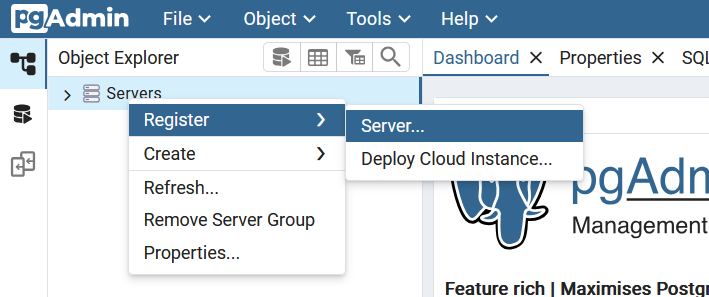
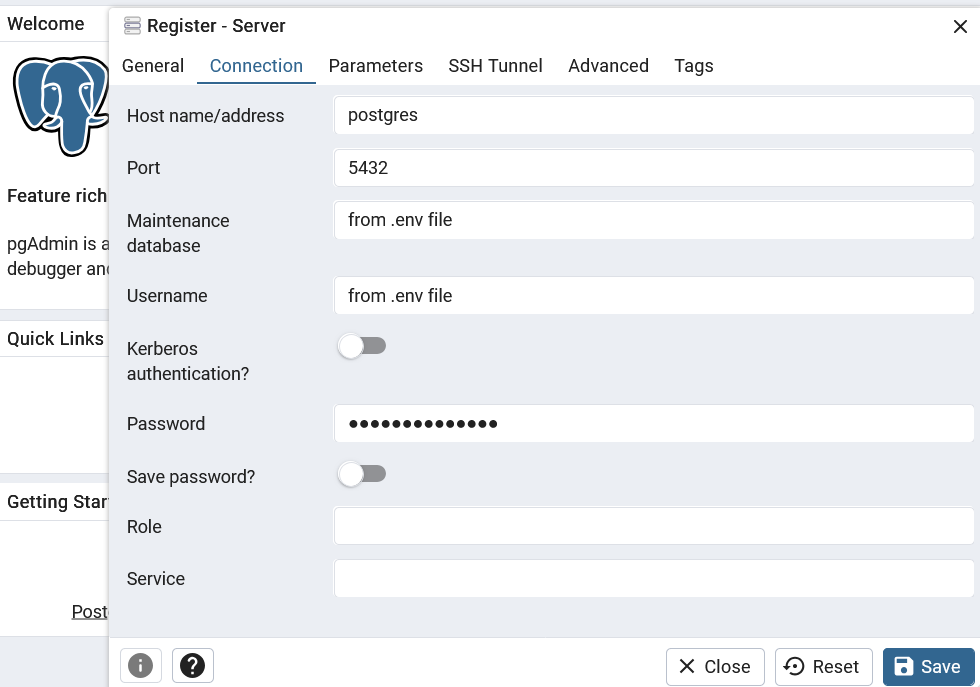
Connection information is present in the .env file. Ask PeaceNexus for login credentials
Remove Duplication in a table
It can happen if you use the init.sql script.
for each table write
SELECT event_id_cnty
FROM draft_schema.acled_events
GROUP BY event_id_cnty
HAVING COUNT(*) > 1;
Update reference .csv file
Before making any change in one of the database table, first make a backup of the table
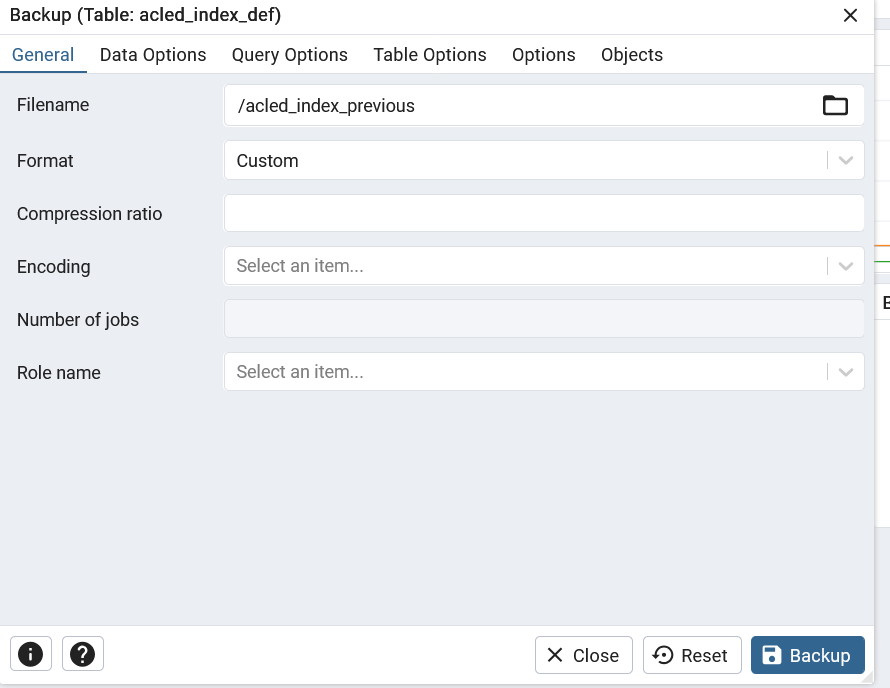
If you have updated only lines, you can truncate the table If a new column is added or removed, you need ot change the structure of it. You can either delete the table or add/remove the columns accordingly
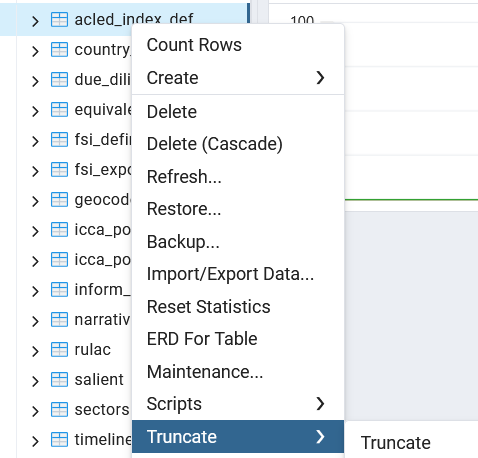 then reinsert data by adapting the code in init.sql and copying it. Don't forget to put the name of the schema inside
Note: some key words such as "indicator" or "date" are treated differently by postgres, it is better not to use them as column names
Note: Make sure you have the good version of the file mounted.
then reinsert data by adapting the code in init.sql and copying it. Don't forget to put the name of the schema inside
Note: some key words such as "indicator" or "date" are treated differently by postgres, it is better not to use them as column names
Note: Make sure you have the good version of the file mounted.
CREATE TABLE IF NOT EXISTS draft_schema.acled_index_def (
  indicator_acled varchar,
  measure varchar,
  significance varchar,
  hover varchar
);

-- Load data from FSI CSV files, one by year
COPY draft_schema.acled_index_def(indicator_acled, measure,significance,hover)
FROM '/docker-entrypoint-initdb.d/Sources/acled_index_def.csv'
DELIMITER ','
CSV HEADER;
Backup
Following the same procedure than in Update .csv file
Make a backup of the whole database here called "draft_schema_9_march"
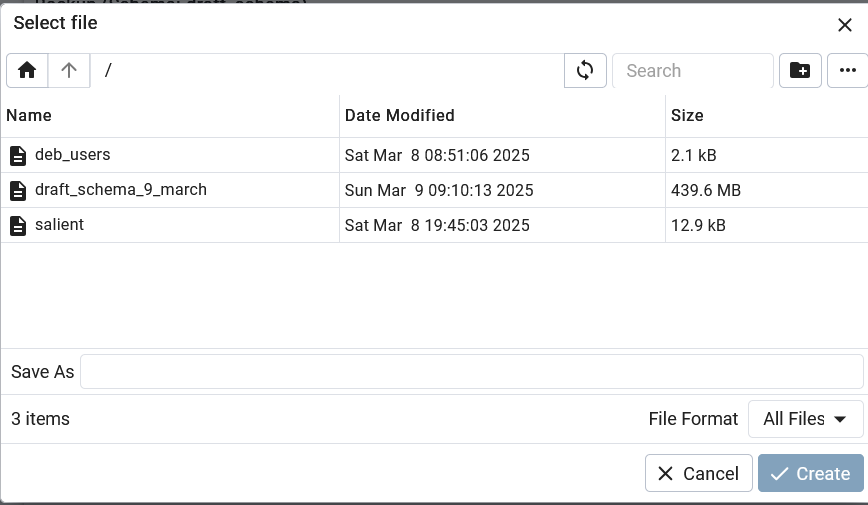 or use the command
/usr/local/pgsql-17/pg_dump --file "/var/lib/pgadmin/storage/tech_peacenexus.org/draft_schema_9_march" --host "postgres" --port "5432" --username "tech" --no-password --format=t --large-objects --verbose --schema "draft_schema" "firstdraftdb"
Save backup from docker container to computer
While running, check for the docker ID of the pgadmin container
docker ps
     PORTS                                        NAMES
4ba8da802cd9   nginx:latest                  "/docker-entrypoint.…"   7 minutes ago   Up 7 minutes   0.0.0.0:443->443/tcp, 0.0.0.0:8080->80/tcp   nginx_container
b1ed44fc3936   digest_firstdraft-flask-app   "sh -c 'pip install …"   7 minutes ago   Up 7 minutes   80/tcp, 0.0.0.0:8000->8000/tcp               flask_container
cc3330347d71   dpage/pgadmin4                "/entrypoint.sh"         21 hours ago    Up 9 minutes   443/tcp, 0.0.0.0:5050->80/tcp                pgadmin_container
3cc0dc90629d   postgis/postgis:latest        "docker-entrypoint.s…"   21 hours ago    Up 9 minutes   0.0.0.0:5432->5432/tcp                       postgres_container
# Copy file locally
docker cp  [ID PGADMIN CONTAINER]:/var/lib/pgadmin/storage/[LOCAL LOGIN]/[NAME BACKUP] [COMPUTER LOCATION]
docker cp  cc3330347d71:/var/lib/pgadmin/storage/tech_peacenexus.org/draft_schema_9_march D:\PeaceNexus\Backup\
Successfully copied 461MB to D:\PeaceNexus\Backup\
Send from computer to online server
# Open new terminal 1
# Go to your backup folder
cd D:/PeaceNexus/Backup
# Copy onto the server folder
scp -r .\draft_schema_9_march root@172.232.44.150:/root/Digest_FirstDraft/
# Enter Password

# Open terminal 2 and connect to server
ssh root@172.232.44.150
# Enter Password
# Go to folder where you have copy the folder
cd Digest_FirstDraft/
# Look for container id
docker ps
CONTAINER ID   IMAGE                         COMMAND                  CREATED         STATUS         PORTS
                                                            NAMES
82847a9d96e1   nginx:latest                  "/docker-entrypoint.…"   6 minutes ago   Up 6 minutes   0.0.0.0:443->443/tcp, :::443->443/tcp, 0.0.0.0:8080->80/tcp, :::8080->80/tcp   nginx_container
b9b8488ea469   dpage/pgadmin4                "/entrypoint.sh"         6 minutes ago   Up 6 minutes   443/tcp, 0.0.0.0:5050->80/tcp, :::5050->80/tcp                                 pgadmin_container
a98691ee5bcf   digest_firstdraft_flask-app   "sh -c 'pip install …"   6 minutes ago   Up 6 minutes   80/tcp, 0.0.0.0:8000->8000/tcp, :::8000->8000/tcp                              flask_container
657b12296771   postgis/postgis:latest        "docker-entrypoint.s…"   6 minutes ago   Up 6 minutes   0.0.0.0:5432->5432/tcp, :::5432->5432/tcp                                      postgres_container
# Check it is copied
ls
app  docker-compose.yml  draft_schema_9_march
# Copy file in container
docker cp draft_schema_9_march b9b8488ea469:/var/lib/pgadmin/storage/tech_peacenexus.org/
If user has not been registered during installation, creates the corresponding folder
# Access docker container
docker exec -it pgadmin_container bash
# Go to folder
cd /var/lib/pgadmin/storage/
# Create missing folder
mkdir tech_peacenexus.org
# Leave the container
exit
# Retry
docker cp draft_schema_9_march b9b8488ea469:/var/lib/pgadmin/storage/tech_peacenexus.org/
you should now see the file online
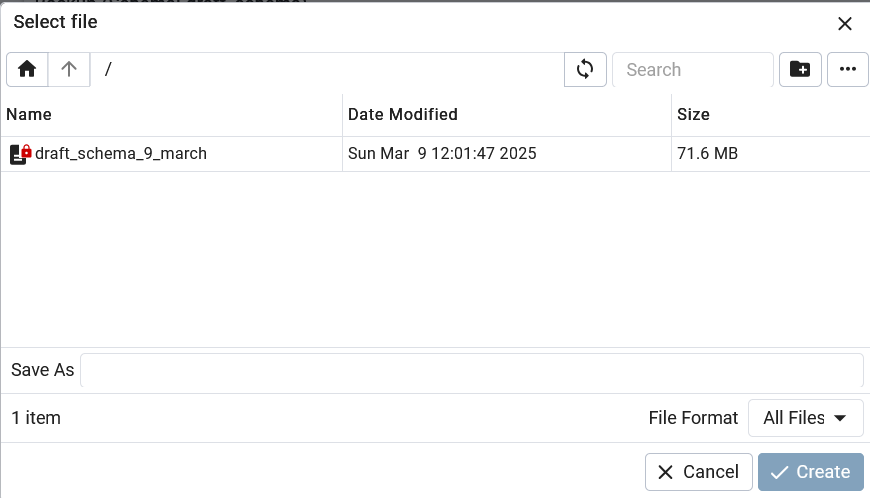
Connect to server / enter password enter the good folder create folder move important files in
ssh root@172.232.44.150

mkdir version_sans_nginx
mv app/ ../version_sans_nginx/
mv Dockerfile docker-compose.yml init.sql favicon.ico ../version_sans_nginx/
If installation from scratch:
Some data